
Roles and responsibilities
A practical overview of the roles used in ArQiver.
Purpose
ArQiver uses role-based access with an active role model. What a user can see and do depends on the role they are currently acting in.
This separation is intentional. It helps users work with the right permissions in the right context, especially across domains, governance responsibilities, and operational work.
Important
ArQiver does not normally merge all permissions from all roles into one combined runtime view. Users act from one active role at a time and should switch roles consciously when working in another context.
Role switching
One user can hold multiple roles, and those roles may also differ per domain.
The portal always works from one active role at a time. Role switching is how a user deliberately moves from one context to another without mixing responsibilities.
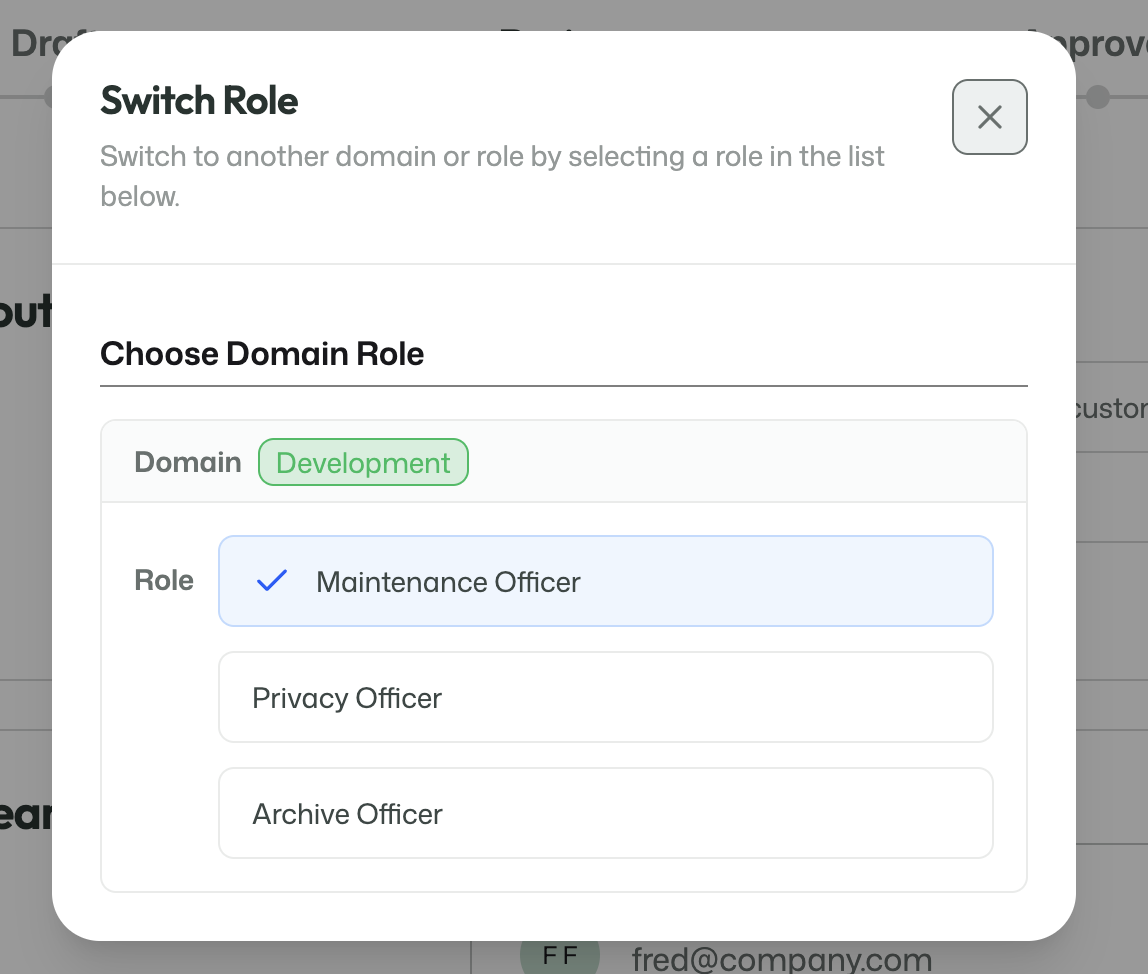
The role switcher shows the roles currently available to the signed-in user.
When a user selects another role, the portal updates to that role's context. That affects:
- the navigation options that are visible;
- the features that can be opened;
- the actions that can be performed;
- the domain-specific responsibilities available in that context.
This is an intentional design choice. ArQiver keeps roles separate so users can stay clear about which responsibility they are acting under.
Quick overview
Dataspace Admin
Creates and maintains the dataspace at enterprise level. This role is focused on account existence, enterprise setup, and assigning top-level ownership.
Dataspace Owner
Governs the structure of the dataspace. This role manages domains, assigns structural roles, and participates in high-level approval.
Domain Owner
Governs a specific domain. This role is responsible for people, structure, and product-related setup within that domain.
Product Manager
Safeguards consistency and coherence across products in a domain.
Product Owner
Owns a product and participates in review and approval flows.
Archive Officer
Reviews archival and records-related aspects before work moves forward.
Privacy Officer
Reviews privacy, lawful processing, and related governance concerns.
Maintenance Officer
Reviews maintenance and lifecycle handling.
Member
Contributes to setup and configuration under governance.
Operator
Uses the workspace and performs operational work in live products.
Role reference
The table below is a practical reference for the current role model in ArQiver.
| Role | Level | Scope | Primary purpose | Typical capabilities | Typical limitations |
|---|---|---|---|---|---|
| Dataspace Admin | Enterprise | Enterprise-wide | Establish and maintain the dataspace | Manage enterprise setup, view domains, assign dataspace owners | Does not create domains directly |
| Dataspace Owner | Enterprise | Enterprise-wide | Govern structure and ownership | Manage domains, assign high-level roles, manage products, approve go-live | Not a general operational role |
| Domain Owner | Domain | Own domain | Govern meaning and structure within a domain | Manage domain roles, templates, streams, products, approvals | Limited to own domain |
| Product Manager | Domain | Own domain | Safeguard product coherence | Manage templates and products, approve go-live | Limited to product/domain context |
| Product Owner | Domain | Own domain | Product accountability | Manage templates, submit reviews, approve go-live | Limited to product/domain context |
| Archive Officer | Domain | Own domain | Archival review | Submit stream reviews | Review-focused role |
| Privacy Officer | Domain | Own domain | Privacy review | Review privacy-related setup and submit reviews | Review-focused role |
| Maintenance Officer | Domain | Own domain | Lifecycle and maintenance review | Submit stream reviews | Review-focused role |
| Member | Domain | Own domain | Contribute under governance | Create metadata, manage data cards, retention, records management, templates | Cannot approve or govern broadly |
| Operator | Runtime | Own role context | Perform operational work | View workspace, manage collections | Does not govern structure or setup |
Implementation note
This page is a practical documentation snapshot of the current role model. The application code remains the leading source for exact permission behavior and may evolve over time.
If you want the practical setup sequence for making domain-level roles usable, see Assigning roles in a new domain.
Why this matters
ArQiver is designed to keep money, meaning, governance, and execution separate where needed. The role model is one of the main ways the platform keeps responsibilities clear and manageable.
That is why role switching, domain context, and deliberate assignment of responsibilities are all central to how the portal works.